

- 平台
- 交易平台
- MetaTrader 5 交易平台
- MetaTrader 5 交易平台 (iOS)
MetaTrader 5 交易平台 (iOS)
功能
苹果手机的MetaTrader 5交易平台包括丰富的功能,方便客户交易。
苹果手机的MetaTrader 5包括:所有交易的功能,各种各样的技术分析的工具(30种技术指标),操作方便。
随时随地进行外汇交易,方便和免费的移动平台 - 苹果手机的MetaTrader 5。
系统需求
iOS 4.0或高于4.0版本的iPhone 3G/3GS/4, iPod Touch和iPad。

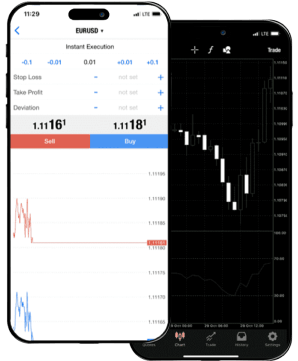
About MetaTrader 5 iOS
MetaTrader 5 for iOS is a fully equipped mobile trading platform that transforms your iPhone or iPad into a professional-grade trading terminal. Tailored for those who require real-time access to financial markets without being tied to a desk, the app brings nearly all the essential features of the desktop version into a clean, responsive interface designed for iOS.
You can open, adjust, and close trades with precision, monitor live quotes, and navigate multi-timeframe charts with touch-optimized controls. All major order types are supported—including market, limit, stop, pending orders—with stop-loss and take-profit options available at setup or anytime after. You can place orders directly from the chart or the order panel with a single tap, which is especially useful when markets move fast and decisions need to be executed without delay.
The charting engine supports multiple styles and integrates dozens of technical indicators, making in-app analysis efficient.
- Pinch to zoom,
- swipe to scroll,
- toggle timeframes in seconds.
On top of trade execution, the app offers a full trading history, real-time news feed, and an integrated economic calendar—features that help you stay ahead of macro events and market-moving releases, even mid-commute.
If you're running Expert Advisors or other strategies on your desktop MT5 terminal, the app mirrors your account activity live. You don’t need to guess where your trades stand—positions, equity, and margin levels are always updated and viewable in real time.
When used with IFC Markets, MetaTrader 5 for iOS connects you to an extensive range of assets:
- forex pairs,
- global indices,
- individual stocks,
- precious metals,
- and commodities
all with reliable execution and stable pricing, even during periods of high volatility.
What sets MT5 for iOS apart is not just portability—it’s how much it lets you do. It's a serious tool for active traders who want to analyze, execute, and monitor positions with the same depth they expect from a full workstation, only on a device that fits in their pocket.
MetaTrader 5 iOS Capacities
MetaTrader 5 iOS is a full-fledged trading app for iOS powered mobile devices. MetaTrader 5 iPhone (MetaTrader 5 iPad) is able to impress any trader by its broad capabilities. Fully functional Forex trading, efficient arsenal of the most critical technical analysis tools (30 technical indicators) and ease of use in everyday activities - all these features are available in MT5 iPhone (MT5 iPad). So, MT5 iOS app offers all you need for successful Forex Trading. You can easily access financial markets from anywhere in the world, at any time and for free. Such possibilities are now available with MetaTrader 5 iPhone. No compromises are tolerated!
特点
- 交易账户管理
- 随时随地进行交易
- 30 种技术指标
- 支持所有订单
- 警报 (Alerts)
- 支持 iPhone, iPad 和 iPod Touch
- 您可以在App Store下载交易平台 iOS版本
删除软件
长按软件图标,转换到移动模式,点击软件图标的左上角的差号。 此外在ios 6及更高版本可以从iphone系统中删除:点击设置设置-> 通用 -> 用量,选择软件并删除


MetaTrader 5 iOS
支持语言
- 英语
- 阿拉伯语
- 捷克语
- 法语
- 德语
- 希腊语
- 印地语
- 印度尼西亚语
- 意大利语
- 日本语
- 韩国语
- 马来语
- 波兰语
- 葡萄牙语 (BR)
- 俄语
- 中文 (CN) - (TW)
- 西班牙语
- 土耳其语
- 乌克兰语
- 越南语
- 荷兰语
- 泰文
连接交易服务器
要进入到您的账户, 您需要完成下列步骤:
- 安装平台MetaTrader 5 iOS 之iPhone (iPad)中
- G进入"设置" 并选择"账户"
- 在弹出的窗口右上角点击按钮 "+"
- 在新窗口中选择 "连接已有账户"
- 在搜索区域输入 " IFCMarkets-Demo " 并选择连接服务器" IFCMarkets-Real "
- 输入用户名和密码, 点击窗口右上角的"登录".